FSimX Studio is a desktop simulation studio that brings three WIOWIZ
tools into one persistent session: the
FSimX simulation engine, the
FSiMX Wave waveform debugger and
Asesha. A load-once,
run-interactively workflow, WIOWIZ-native.
One persistent session, not three tools bolted together
Open a project, compile it, load it once, and drive it interactively.
Hierarchy, objects, source, waveform and transcript stay live and
cross-probed, so you run, break, examine and restart from a single
window, without re-elaborating between runs.
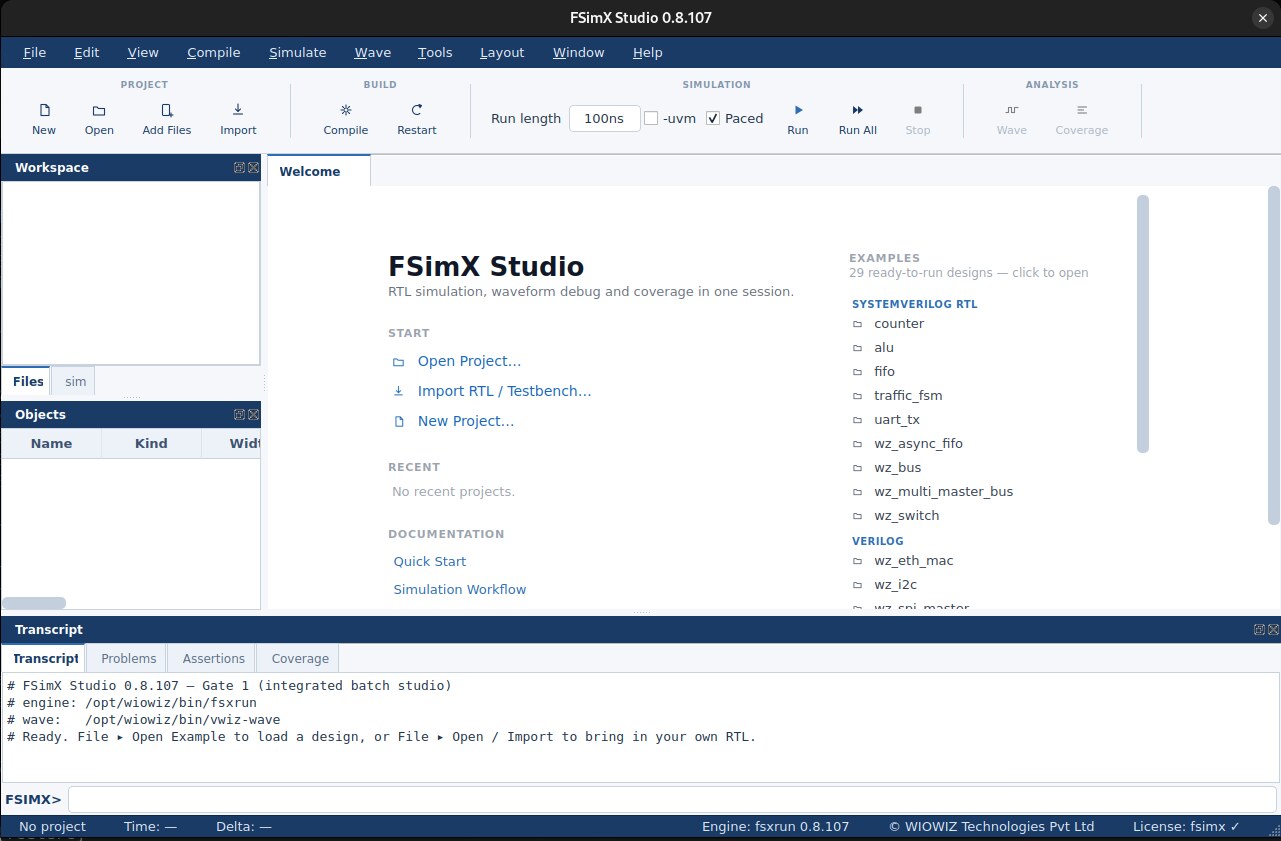
FSimX Studio 0.8.107 — the Welcome page: Workspace and Objects,
the 29-example catalog, and the transcript, in one window
See it run
Short screencasts from the studio — tour a mini-SoC, catch a bad
run in the RISC-V ISS, decode protocols off the wave, debug in
FSiMX Wave and close coverage in Asesha.
The mini-SoC tour
Load the WIOWIZ mini-SoC and drive it interactively from one
session.
RISC-V ISS lockstep
The instruction-set sim runs in lockstep and flags a known-bad
run.
Decode UART traffic
The transaction analyzer decodes UART frames straight off the
waveform.
PCIe transactions
Follow PCIe peripheral transactions through the modelled SoC.
Waveform debug · FSiMX Wave
Cursors, A–B deltas and cross-probe to source on a live
waveform.
Coverage closure · Asesha
Code, functional and assertion coverage merged with formal UNR.
1 · Invoke the GUI and simulate
Launch the studio, open a project and run it. Every bundled example is
self-checking and prints an explicit
PASS in the
transcript.
1
Launch the studio.Download the Docker bundle below, then
./verify.sh to build the image and
./run.sh to launch.
2
Open a project.File › Open Project, then pick a
.fsp (counter, ALU, FIFO, traffic FSM,
UART, a multi-master bus, a UVM memory, or a multi-domain
low-power SoC).
3
Run All.The design compiles, elaborates and runs; the hierarchy and
objects light up and the waveform opens automatically. Restart
returns to t=0 without recompiling.
# build the image from the bundle, then launch cd fsimx-studio-public ./verify.sh ./run.sh # then File › Open Project ›
examples/sv/counter/counter.fsp → Run All
2 · Debug with FSiMX Wave
The waveform opens on the same loaded design. FSiMX Wave subscribes
only to the signals you are watching, so it stays responsive on
SoC-scale designs with tens of thousands of signals, and cross-probes
between the wave, the source and the hierarchy.
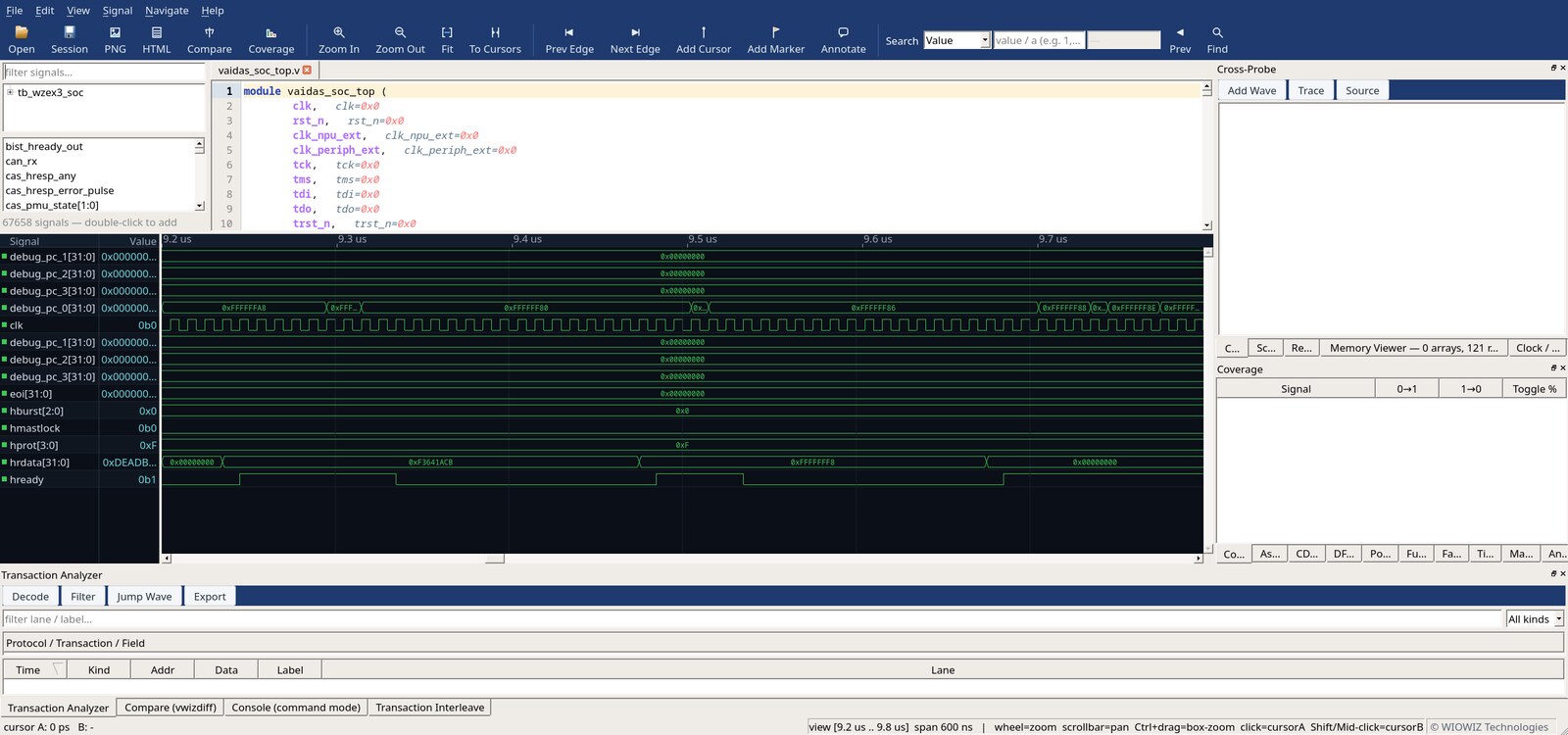
FSiMX Wave on a RISC-V SoC, source with inline values, waveform,
cross-probe and the transaction analyzer
›
Add signals from the filtered signal list, drop cursors and named
markers, jump edge to edge, and annotate. Click a signal to
cross-probe straight to its driver in the source. Decode bus
traffic in the transaction analyzer, and reconstruct memories in
the viewer. FST stays the archival format.
3 · Close with Asesha
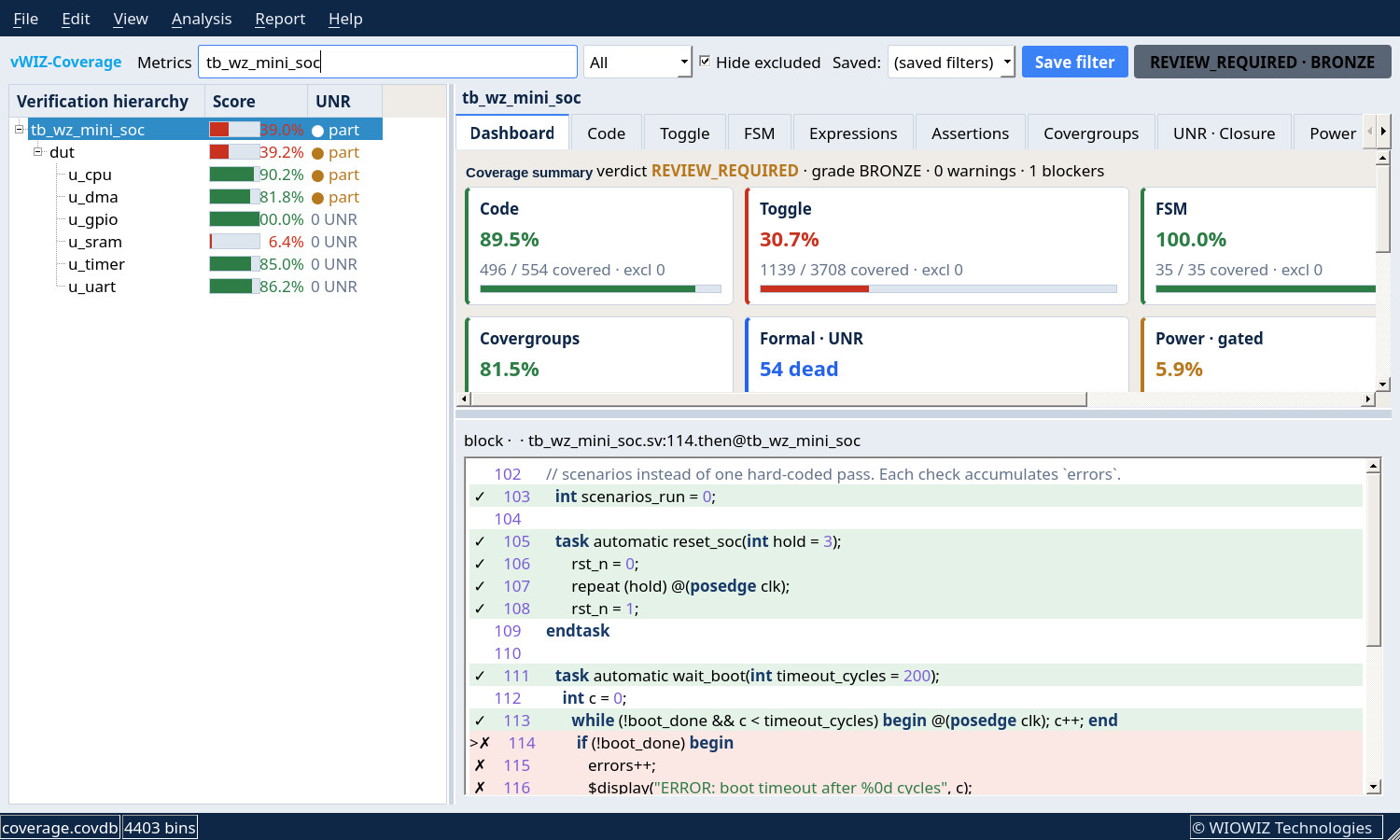
The same run feeds Asesha. Code, functional and assertion
coverage merge with formal unreachable (UNR) analysis into one closure
picture, so you finish with evidence rather than assumptions.
Asesha closure on the WIOWIZ mini-SoC, code, toggle, FSM and
functional coverage with UNR
The same studio, your platform — Linux as a Docker bundle that
leaves nothing on your machine beyond the container, or a native
Windows installer that bundles everything it needs. You always get the
latest release.
Before you install.
Linux runs as a Docker container and needs Docker only. The native
Windows build is a normal installer — Windows 10 or 11, 64-bit,
about 120 MB on disk; it bundles everything it needs, so there is
no Qt or runtime to install first. Waveform view uses OpenGL; on
machines with no GPU driver (older desktops, virtual machines, remote
desktop sessions) it falls back to bundled software rendering, which
works but paints more slowly. The evaluation licence is included and
runs 30 days. If a window does not appear, send us
%LOCALAPPDATA%\WIOWIZ\ — the startup
logs there tell us exactly which stage stopped. For licensing and
support, email
support@wiowiz.com.
At a glance
Version
0.8.124 (eval) — you always download the latest release
What it is
Desktop RTL simulation and debug studio (FSimX engine,
FSiMX Wave, Asesha)
Workflow
Project, compile, elaborate, load once, run interactively,
break, examine, force, restart without re-elaboration
Waveform
FSiMX Wave, subscribe-only tracing, cross-probe to source and
hierarchy, transaction analyzer, FST archival
Coverage
Asesha, code, functional and assertion coverage with
formal UNR closure
Platforms
Linux x86-64 (Docker image) and native Windows x64 (Windows 10 /
11)